Keyword focus: how to use a router table
Meta description: Learn how to use a router table step by step — from mounting your router and setting bit height to fence alignment, feed direction, and safety. The ultimate beginner’s guide.
If you’ve ever used a handheld router and thought “there has to be a better way,” you were right. Learning how to use a router table is the single upgrade that transforms a capable tool into a precision workhorse. It frees your hands, steadies your workpiece, and unlocks joinery and edge profiles that are nearly impossible to achieve with a router alone.
This guide walks you through everything: what a router table is, how to mount your router, how to set up the fence and bit height, how to feed wood safely, and what kinds of cuts you can make. Whether you’re picking up a router table for the first time or trying to get better results from one you already own, you’re in the right place.
1. What Is a Router Table and Why Use One? {#what-is-a-router-table}

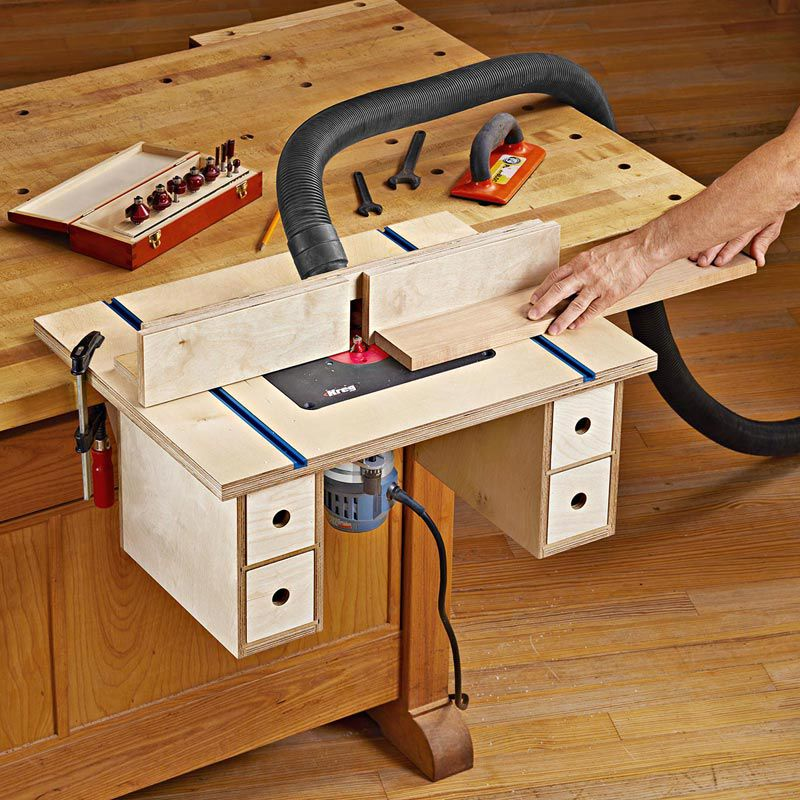
A router table is a flat work surface with a router mounted upside down beneath it, so the bit points upward through an opening in the tabletop. Instead of guiding the router across a stationary workpiece, you guide the workpiece across a stationary, spinning bit.
This one change does a lot:
- Both hands stay on the wood. You’re not gripping a router body — you’re controlling the material with full attention.
- Fences, stops, and featherboards become available. These accessories would be impossible to use with a handheld router on most cuts.
- Small pieces are safer. Narrow stock that’s difficult to rout freehand is far more manageable when you feed it past a table-mounted bit.
- Repeatable cuts become easy. Set it once and run ten identical pieces through without re-measuring.
- You can see what the bit is doing. Looking down at a bit from above gives you a clear view of the cut as it happens.
The result is more control, more precision, and — when done correctly — a safer work environment than hand-routing many of the same tasks.
2. Router Table Components: Know Your Setup {#components}

Before you learn how to use a router table, understand the parts you’re working with.
The tabletop must be flat. Any rock or warp means your workpiece won’t ride evenly, causing inconsistent cuts. Most quality tables use MDF cores with laminate skins or cast iron/aluminum surfaces. Check flatness with a 24-inch straightedge — a 12-inch ruler isn’t long enough to catch subtle dips.
The insert plate (router lift) sits flush in the tabletop opening and holds the router. It’s critical that this plate is level with the table surface — if it’s even slightly proud, wood catches on the edge; if it’s low, cuts are inconsistent. Adjust the leveling screws until a straightedge lies flat across the plate and table with no gap or rocking.
The fence is the adjustable guide that controls how much of the bit engages the wood. A good fence has two independently adjustable halves (infeed and outfeed sides) and a dust collection port. It does not need to be parallel to the table’s edge — what matters is its distance from the bit.
The router mounts beneath the table with the collet pointing up. Most serious woodworkers use a fixed-base router with 2–3.5 horsepower for table work. Larger bits require more power; a underpowered router will bog down and burn.
Accessories worth having from day one: featherboards, push blocks, push sticks, and a bit guard. These aren’t optional extras — they’re the difference between controlled cuts and dangerous kickback.
3. Choosing the Right Router for Your Table {#choosing-router}

Most router tables are designed for full-size (not compact) routers, and the more horsepower the better. A 2¼ HP motor is the practical minimum; 3 HP is the preferred standard among experienced woodworkers.
A few things to look for when pairing a router with a table:
- Fixed base, not plunge. Fixed-base routers are more stable in table mounts and easier to adjust for height.
- Above-the-table height adjustment. Some routers and lift systems let you raise or lower the bit with a shaft from above the table — a major convenience.
- Combo kits. If you buy a combo kit (one motor, a fixed base, and a plunge base), you can dedicate one base permanently to the table and keep the other for handheld routing.
- Soft-start and variable speed. Larger bits should run at lower RPMs. A router with variable speed control lets you dial in the right setting for each bit.
Check your router table’s mounting plate compatibility before purchasing — not all tables accept every brand.
4. How to Mount Your Router in the Table {#mounting}

Mounting the router correctly is the foundation of everything else. A loose or misaligned mount causes vibration, poor cuts, and safety risks.
Step 1: Unplug the router.
Always. No exceptions when handling the router or changing anything near the bit.
Step 2: Remove the base plate from your router.
Most router tables use a dedicated insert plate with holes that match your router’s base bolt pattern. If your table came with a blank plate, you’ll need to drill mounting holes to match your router.
Step 3: Attach the router to the insert plate.
Thread the router’s mounting bolts through the insert plate from above (or below, depending on the design) and tighten securely. The router collet should point upward through the plate’s center opening.
Step 4: Drop the plate into the table opening.
The plate rests on ledges inside the table opening. Adjust the leveling screws until the plate is perfectly flush with the tabletop. Run a straightedge across the joint to confirm — no step in either direction.
Step 5: Lock the plate in place.
Most plates have recessed screws or locking tabs. Tighten them so the plate cannot shift during use.
5. How to Install and Change Router Bits {#bits}

Always unplug the router before touching the bit. This is the single most important safety rule in router table use — the bit spins at 20,000+ RPM and can cause serious injury in an instant if the motor starts unexpectedly.
To install a bit:
- Insert the bit’s shank into the collet.
- Push it in fully, then pull it back out about ¼ inch (roughly 6mm). This gap prevents the shank from bottoming out in the collet, which can cause the bit to work loose.
- At least two-thirds of the shank must be inside the collet. If the shank is too short for that, the bit is undersized for your collet.
- Tighten the collet nut firmly — most routers require two wrenches (one to hold the shaft, one to tighten the nut).
After installing, rotate the bit by hand before powering on. It should spin freely without scraping the insert plate or fence faces.
6. Setting Bit Height: Step-by-Step {#bit-height}

Bit height determines how deep the router cuts into the wood. Get it right before every cut.
Rule 1: Start low, raise gradually.
For deep profiles or significant material removal, never try to reach full depth in one pass. Set the bit low, make a pass, raise slightly, make another pass. This reduces stress on the bit and motor and produces cleaner cuts.
Rule 2: Cuts deeper than about ⅜ inch should be done in multiple passes.
Going too deep in one shot can strain the motor, damage the bit, and leave a rough or chattered surface.
How to set height precisely:
- Unplug the router.
- Use a ruler held against the table to measure from the tabletop to the tip of the bit. For profile bits, measure to the cutting edge you want at the surface.
- Adjust the router height using the router’s height adjustment mechanism (or the lift system if your table has one).
- Rotate the bit by hand to confirm the height is consistent throughout its rotation — some bits have uneven profiles.
- Make a test cut on scrap wood and measure the result. Adjust as needed.
For router tables with a lift: the lift handle or hex shaft extends above the table, letting you make fine height adjustments without reaching underneath. This is the most accurate and convenient way to dial in bit height.
7. How to Set and Align the Fence {#fence}

The fence is your primary guide for most router table operations. Proper fence setup is what separates accurate, repeatable cuts from frustrating results.
The fence does not need to be parallel to the table’s edge. Unlike a table saw, the router bit is round — the fence simply needs to be positioned at the correct distance from the bit and locked so it doesn’t shift during the cut.
Setting the fence for standard cuts (partial bit exposure)
- Unplug the router.
- Place a ruler across the center of the bit opening. Rotate the bit by hand so a cutting tip points toward the fence.
- Slide the fence until the distance from the fence face to the cutting tip equals your desired depth of cut.
- Tighten the fence clamps fully. A loose fence will shift under pressure.
- Close the fence faces as close to the bit as possible, leaving just enough clearance for the bit to spin. This “zero-clearance” setup prevents the wood’s edge from catching on gaps around the bit.
Setting the fence for bearing-guided bits
Bits with a pilot bearing at the tip or heel don’t rely on fence position for cut depth — the bearing rides the wood and controls the cut. For these bits:
- Set the fence aligned with the bearing’s outer edge.
- Lay a straightedge across the fence and adjust until there’s just a paper-thin gap between the bearing and the straightedge.
- The fence now acts as a guide and anti-kickback device rather than a depth stop.
Fine-tuning the fence
If you need to adjust the fence by a tiny amount, loosen only one end. The fence pivots from the tight end, giving you finer control over small adjustments than moving both ends at once. Mark the fence position on the table with a pencil before you start so you can track movement.
8. Feed Direction: The Rule That Keeps You Safe {#feed-direction}

Feed direction is arguably the most important operating concept in router table use. Get it wrong and the router can violently snatch the wood from your hands.
Always feed the workpiece from right to left when using the fence.
Here’s why: router bits spin counterclockwise when viewed from above. Feeding from right to left means the bit’s cutting edges are working against your feed direction — each tooth grabs a chip and releases it. This is called conventional or climb-cut-safe feed direction.
If you feed from left to right (climb cutting), the bit’s rotation is working with your feed direction, not against it. The bit tries to pull the wood — and your hands — into itself. This can cause sudden, violent kickback that’s nearly impossible to control.
To visualize correct feed direction: stand in front of the table. Hold your hands out. Wood enters from your right, moves past the bit, and exits to your left.
The one exception: very light climb cuts (taking just a whisker of material) are sometimes used by advanced woodworkers to prevent tear-out. These should only be attempted by experienced users who understand the risk and are taking an extremely shallow pass.
9. Router Table Safety Rules {#safety}

A router table is one of the more demanding tools in a woodshop for safety. The high RPM, upward-pointing bit, and need to keep hands near the cut zone all require consistent habits.
Always unplug before changing bits or making adjustments. This cannot be overstated. Some tables have removable plugs or safety locks — use them, but don’t rely on them alone.
Wear safety glasses and hearing protection every time. Router bits spinning at 20,000 RPM throw debris. The noise level from a router can cause cumulative hearing damage over time.
Never rout pieces smaller than 12 inches long or 3 inches wide without a jig. Small pieces bring your fingers too close to the bit. Instead, rout larger stock and cut to final size afterward, or build a sled or push jig to hold small parts safely.
Use push blocks, not fingers. Keep your hands behind push blocks or push pads when feeding wood near the bit. Featherboards mounted on the fence and table keep the workpiece pressed in place and reduce your need to apply force near the cut.
Use a bit guard whenever possible. Many router tables come with transparent guards that cover the exposed bit above the table. These should be in place whenever the cut geometry allows it.
Don’t start the router with the wood already touching the bit. Start the router, let it reach full speed, then bring the wood into contact from the infeed side.
Connect dust collection. Beyond cleanliness, sawdust near a spinning bit can obscure your view and create slip hazards.
10. What Can You Do with a Router Table? {#what-can-you-do}

Once your router table is properly set up, the range of cuts available is impressive.
Edge profiling is the most common starting point. With round-over, chamfer, cove, ogee, and bead bits, you can shape the edges of boards for furniture, cabinets, trim, and frames — all with consistent, repeatable results that would be tedious to achieve freehand.
Molding is where router tables excel over handheld routing. Run wide stock past a profiling bit, then rip the molded strip free on the table saw. The router table gives you a stable platform; the wide stock keeps your hands safely away from the bit.
Joinery opens up once you add a few more bits. Rabbets, dadoes, grooves, and slots are all straightforward. Raised panel bits (used at low RPM) let you create door panels. Box joints, sliding dovetails, mortises, and tenons are all achievable with the right setup.
Edge jointing is a useful space-saver. By offsetting the outfeed fence slightly forward of the infeed fence (shimming it out), you can use a straight bit to joint edges flat — a function that typically requires a dedicated jointer.
Curved work using a starting pin and bearing-guided bits lets you rout freehand profiles on curved or shaped pieces without a fence.
11. Pro Tips for Better Results {#pro-tips}

Wax the table surface. A light coat of paste wax on the router table top every few months lets wood slide freely and prevents friction burns. Don’t wax the fence face — you want the wood to grip there.
Make molding from wide stock. Routing a profile on a narrow strip is harder to control and more dangerous. Rout on a wide board, then rip the profiled strip free afterward.
Sneak up on final dimensions. Use stop blocks and shims to approach a precise cut gradually rather than trying to hit it in one pass. Move one end of the fence and you’ll get half that movement at the bit.
Test cuts on scrap are non-negotiable. Always run a test piece through before committing to finished stock. Check the result, adjust, test again.
Close the fence gap around the bit. The opening in the fence behind or below the bit can snag a workpiece edge. Slide the fence faces in as close as possible to the bit (clearance only, not touching) or install a zero-clearance insert.
For large panels, add a tall auxiliary fence. Standard fences don’t support raised panels or wide workpieces from tipping. A tall auxiliary fence and an anti-tip rail above the table solve this.
Use featherboards on both surfaces. One featherboard on the table (pressing wood down) and one on the fence (pressing wood toward the fence) gives you two-axis control without needing to apply constant hand pressure.
12. Common Mistakes and How to Fix Them {#common-mistakes}

Problem: Wood gets pulled aggressively through the cut
Cause: Feeding in the wrong direction (left to right instead of right to left).
Fix: Always feed right to left. Stop, re-approach from the correct side.
Problem: Burning on the edge
Cause: Feed rate too slow, bit is dull, or cutting too deep in one pass.
Fix: Move the wood through at a steady, continuous pace — don’t pause mid-cut. Reduce cut depth. Replace or sharpen dull bits.
Problem: Chatter or tear-out
Cause: Too much material being removed in one pass, or the bit is dull.
Fix: Take lighter passes. Let the bit do the work; don’t force the wood.
Problem: The workpiece catches on the table insert
Cause: The insert plate is sitting slightly above the table surface.
Fix: Adjust the leveling screws on the insert plate until it’s flush with or very slightly below the tabletop.
Problem: Cut depth varies across the length of the piece
Cause: Fence is shifting under pressure, or tabletop isn’t flat.
Fix: Tighten fence clamps completely. Check tabletop flatness with a straightedge. Check that the insert plate is level.
Problem: Bit comes loose during the cut
Cause: Bit wasn’t seated ¼ inch above the collet bottom, or the collet wasn’t tightened properly.
Fix: Re-install the bit with the correct gap, use two wrenches, and tighten firmly.
13. FAQ {#faq}

Do I need to square the router table fence to the table edge?
No. Unlike a table saw, fence parallelism to the table edge doesn’t matter for router table work. What matters is the fence’s distance from the bit and that it’s locked solidly in place.
Which way should I feed wood through a router table?
Right to left when using the fence. This feeds against the bit’s rotation for safe, controlled cuts.
How high should I set the router bit?
It depends on the cut, but the rule of thumb is to remove no more than ⅜ inch per pass. Set bit height on scrap, test, then adjust until the profile is correct.
Can I use a compact router in a router table?
You can, but most router tables are designed for full-size routers. Compact routers lack the power for larger bits and raised panel work. For edge profiling and light joinery on small pieces, a compact router in a suitable table works fine.
Can I use a router table as a jointer?
Yes. By shimming the outfeed fence slightly forward of the infeed fence (by the depth of cut), a straight bit can flatten board edges the same way a jointer does. It’s a popular space-saving alternative in smaller shops.
How do I prevent burning when edge profiling?
Move the wood through at a steady, continuous rate without stopping. Stopping mid-cut while the bit spins against the wood causes burning instantly. Also check that your bit is sharp and your RPM setting is appropriate for the bit size.
What’s the minimum piece size I can safely rout on a table?
As a general guideline, don’t handfeed pieces shorter than 12 inches or narrower than 3 inches. For smaller pieces, build a push sled or jig, or rout larger stock and cut to size afterward.
Final Thoughts
A router table rewards patience in setup and consistency in technique. The steps above — flat table, level insert plate, proper bit installation, correct fence position, right-to-left feed direction, and steady pace — cover the vast majority of what makes a router table work well or poorly.
Start with simple edge profiles on scrap wood. Get comfortable with how the machine behaves before moving to joinery or more complex cuts. The learning curve is short, and once you have the fundamentals locked in, the router table becomes one of the most used tools in your shop.
Last updated: June 2026